
Navigating the Marketplace Landing Page
最后更新: 2026年7月3日
Navigating the Marketplace Landing Page
The Landing Page serves as the central hub of the Marketplace Seller Portal, providing a summary of other screens. Below is a breakdown of the main sections of the landing screen.
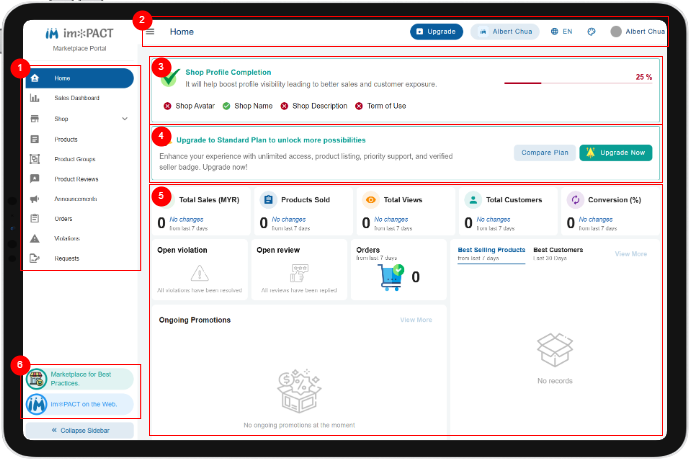

Menu Bar:
This is where you can navigate the Marketplace Portal. All of your permitted functionality is listed here.
App Bar:
This is where you can upgrade your account, switch to different shops (if you have multiple shops) and change the site language. You can also access your user profile and change your credentials here.

Shop Profile Completion:
This is a reminder for you to complete the maintain your shop profile before you publish any products.

Upgrade Subscription:
This is a suggestion for you to upgrade to a paid plan. Only shops with paid plans are allowed to list paid products.

Seller's Dashboard:
This area list all the important metrics for a shop in a consolidated view. It shows the following:
- Total Sales
- Products Sold
- Total Views
- Total Customers
- Conversion
- Open Violations
- Open Reviews
- Orders
- Ongoing Promotions
- Best Selling Products
- Best Customers
Content Area:
This is the area where all the content this button would show you a review of what you have specified.

Shortcuts:
This is a shortcut to access the Marketplace and IMPACT web.