
Navigating the Project Listing Page
最后更新: 2026年7月3日
Navigating the Project Listing Page
The Product Listing Page is where all your products are maintained in IMPACT Marketplace Portal.
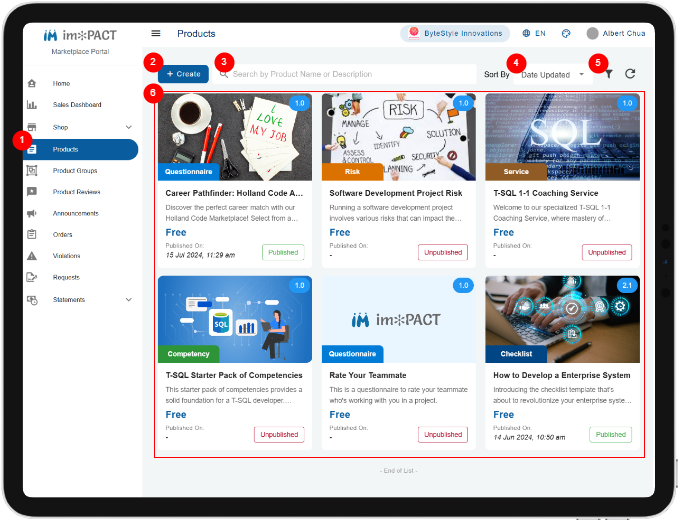
**Products Menu:
 ** This is where you can navigate the Product Listing screen.
Create Button: Click this button if you want to create a new product.
**Search Text:
** This is where you can navigate the Product Listing screen.
Create Button: Click this button if you want to create a new product.
**Search Text:
 ** Enter the text to search the product by the title and description.
**Sort By:
** Enter the text to search the product by the title and description.
**Sort By:
 ** Select this to sort the search result.
**Advance Filter:
** Select this to sort the search result.
**Advance Filter:
 ** Click this if you want to refine your search results.
**Search Results Area:
** Click this if you want to refine your search results.
**Search Results Area:
 ** This is where the search result will appear. Click on the search results to view and edit the your product.

关键词: marketplace