
Upcoming Release Notes – 18 Mar 2026
March 2026
The Biggest IMPACT Update Yet
A Brand New Look
You will spend hours in IMPACT every day and it should feel good to use. So, we rebuilt the entire interface to be cleaner, faster, and easier on the eyes. Every screen now follows a consistent split-panel layout where you can browse on the left and dive into details on the right, without ever leaving the page. This isn’t just a fresh coat of paint. It’s a better way to work.
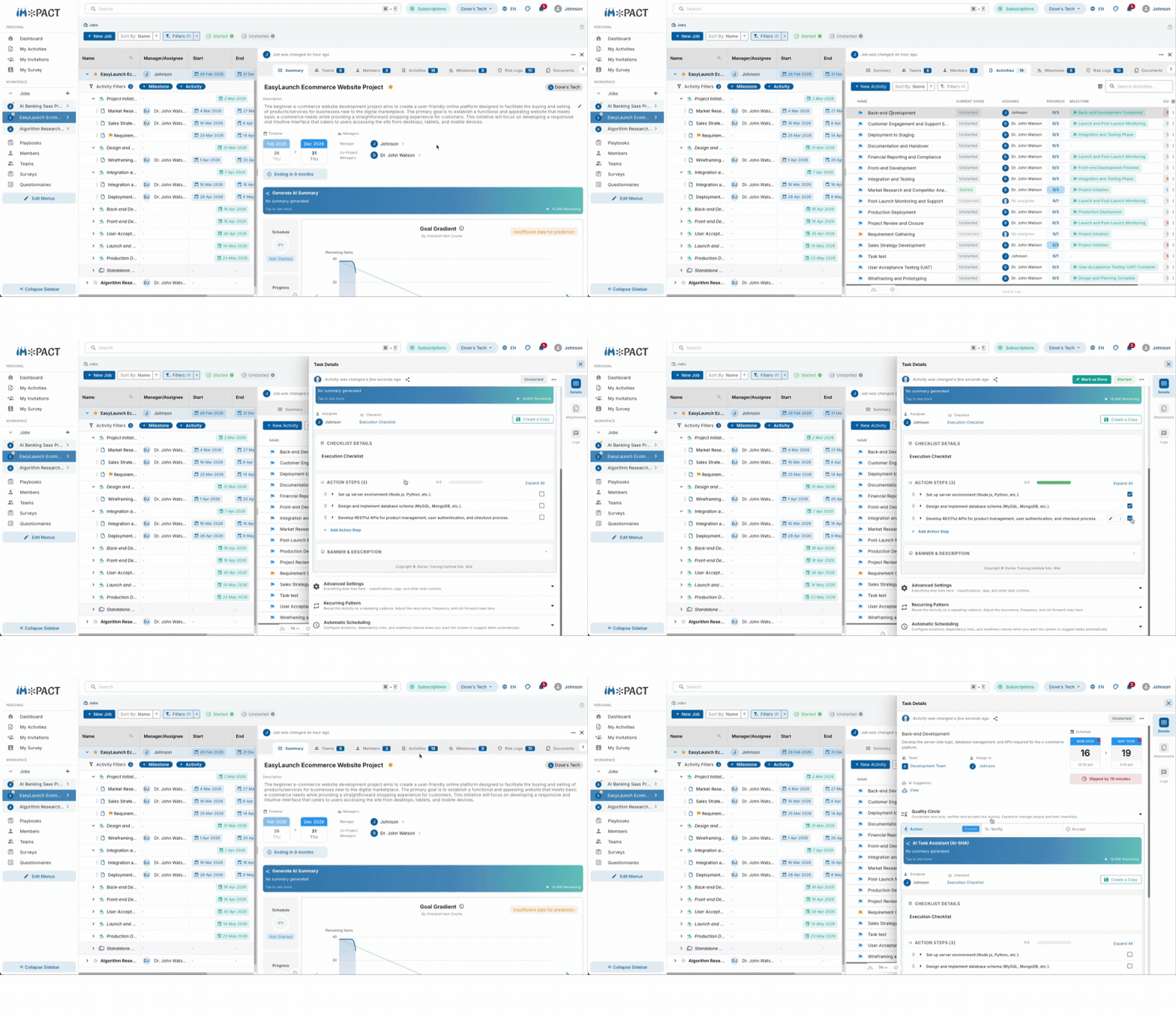
Split-Panel Layout
No more jumping between pages to view and edit. Select a project, task, or team from the list and its details appear right beside it. Browse, compare, and update without losing your place.
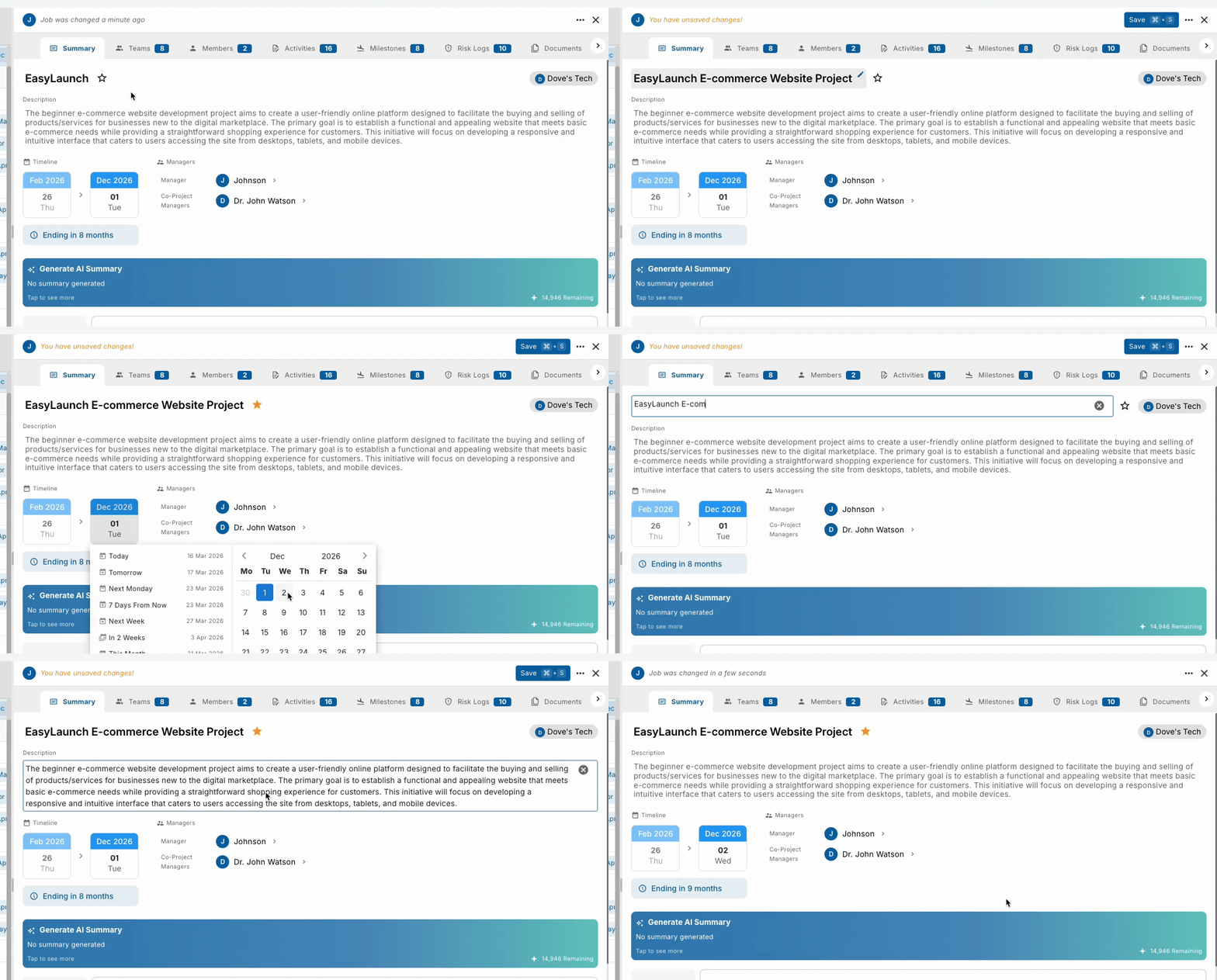
Inline Editing
Click on any field and edit it right there. Names, dates, descriptions, statuses. No more opening a separate form just to change one thing.
Sidebar Customization
Your sidebar, your rules. Drag to reorder menu items, hide what you don’t use, and pin what matters most. The navigation should match how you work, not the other way around.
Gantt Chart
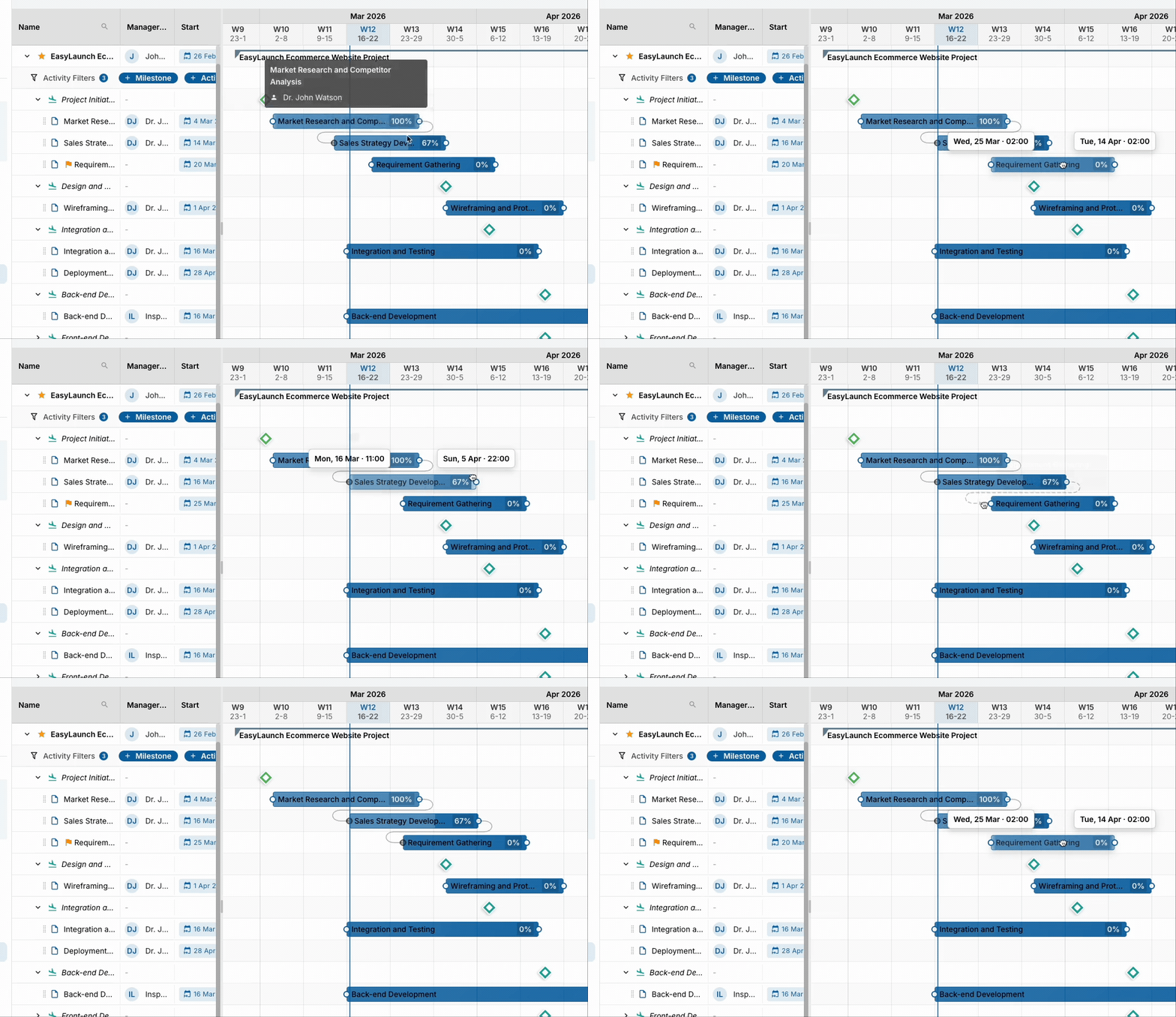
Planning a project shouldn’t mean jumping between spreadsheets and calendars. The new Gantt chart lays out your entire project on a visual timeline. Drag tasks to adjust dates, link dependencies so nothing falls through the cracks, and drop milestones to mark what matters. One view, full picture.
Drag to Reschedule
Plans change. Grab any task bar and drag it to a new date. The update saves automatically so your timeline always reflects reality.
Dependencies
Connect tasks that depend on each other by dragging a line between them. You’ll see exactly what needs to finish before something else can start, and spot bottlenecks before they slow you down.
Create Without Leaving
Add new milestones and tasks directly from the Gantt chart. No need to navigate somewhere else just to add something you can already see is missing.
Dashboard and Infographics
Every morning starts the same way. You log in and try to figure out where things stand. How’s the project going? Is anyone blocked? What needs your attention today? That used to mean clicking through projects, checking tasks, and piecing the picture together yourself. Your dashboard now does that for you. It pulls together the metrics you care about into one screen, so you can walk in, see the state of things, and start making decisions right away.
Custom Dashboards
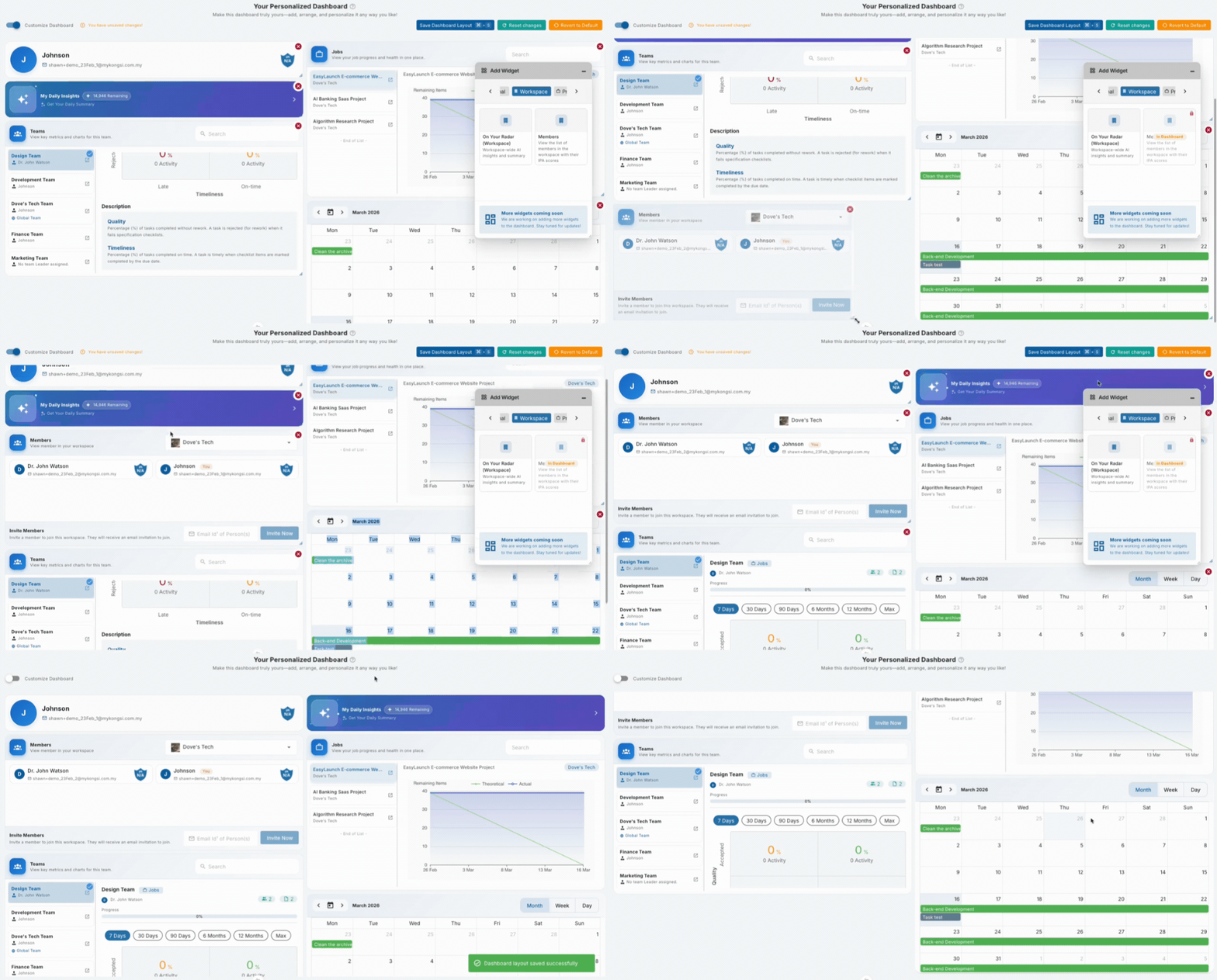
Everyone’s role is different. A project manager cares about milestone progress. A team lead wants to see who’s overloaded. Choose from widgets covering project health, task completion, team performance, and more. Your dashboard should reflect what you actually need to know.
Grid Layout
Drag and arrange widgets however you like. Put what matters most front and center so the first thing you see every morning is the first thing you need to act on.
Floating Task Panel
See something that needs attention? Open the task details right from your dashboard. Fix it, assign it, or comment on it without losing your place.
The Todo Screen
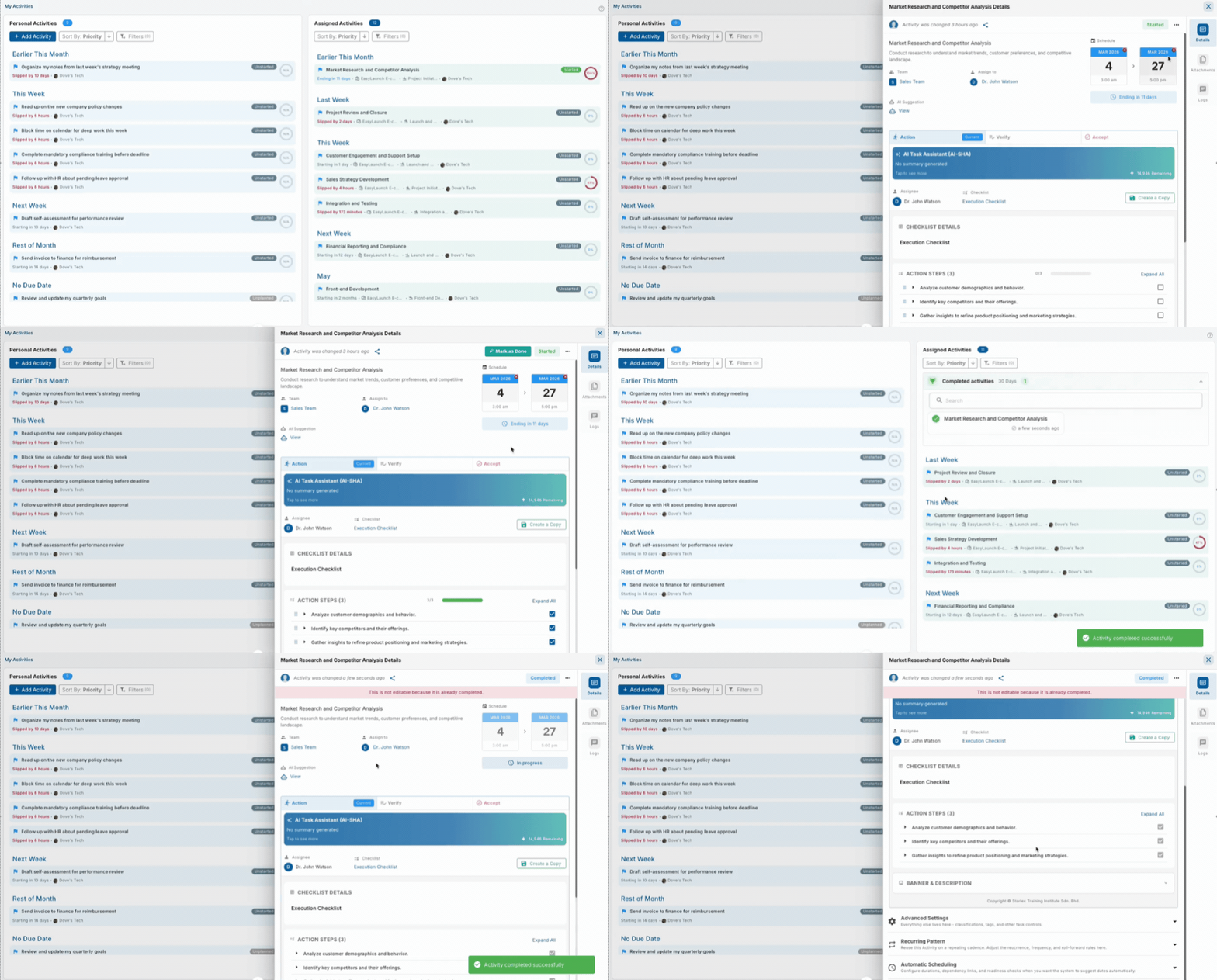
Your tasks live in different projects, across different teams, under different milestones. When you sit down to work, the first question is always the same: “What do I need to do right now?” The Todo screen exists to answer that question. It pulls everything assigned to you into one place so you can stop searching and start doing. No more clicking through projects one by one to figure out your day.
All Your Tasks, One Screen
My tasks
More Updates
New Features
When discussions about a task happen in a separate chat, context gets lost and new team members can’t find it. Comments now live directly on tasks and projects, so the conversation stays attached to the work and everyone can see the full history.
When something changes on a task and no one knows who or when, it creates confusion. The activity log records every change, comment, and update in a timeline, so you can trace decisions and understand how a task evolved.
Field teams and anyone with unreliable internet used to lose their work or wait for a connection. Now you can check in, update tasks, and mark progress while fully offline. When you reconnect, im*PACT syncs everything and flags conflicts so nothing gets silently overwritten.
Building a daily check-in habit is hard when nothing reminds you. The app now prompts you when you open it, so your rhythm stays on track and your team gets better visibility into progress.
Duplicating a project used to keep the original dates, which meant adjusting every deadline manually. Now you can shift all dates forward or backward by days, months, or years during duplication, saving hours of manual work for teams that run similar projects on a regular cycle.
New team members used to land in im*PACT with no guidance, which meant someone had to walk them through it. Both web and mobile now have a step-by-step wizard. Web adds contextual tooltips as you explore. Mobile offers tailored flows for invited vs self-registered users. New users get productive faster, and your team spends less time answering “how do I…” questions.
Viewing an attached file used to mean downloading it and opening another app. You can now preview images, PDFs, videos, and audio inline in a full-screen gallery, which saves time when scanning through attachments during reviews.
A fixed sidebar forces everyone into the same layout, but a project manager navigates to different screens than a team member. You can now drag to reorder, toggle off what you don’t use, and pin what you access most, so your navigation matches how you actually work.
Each module used to have its own layout, which meant relearning every screen. Projects, teams, members, milestones, surveys, questionnaires, competencies, and risk logs now all use a consistent split-panel layout. Once you learn one, you know them all.
Not every organization wants every team member using AI features freely. Admins can now configure permissions per user for summaries, project generation, task assistance, checklist generation, infographics, and performance reviews, so you control how AI is adopted across your team.
Changing a single field used to mean opening a separate form, editing, and saving. Now you can click any field and edit it right there: task names, dates, descriptions, project details, competencies, questionnaires. Faster corrections, fewer interruptions.
Bug Fixes
Web
- Fixed check-in tile not showing up for users who had never checked in before.
- Fixed previous user’s data sometimes appearing after logging out and logging in as a different user.
- Fixed notification badge overlapping the menu button on certain screen sizes.
- Fixed assigning verifier or acceptance roles to a task failing silently.
- Fixed risk heatmap clicks leading to a “page not found” screen.
- Fixed project customer, tags, work class, and work type not saving when set.
- Fixed deleted projects still appearing in the list until a manual page reload.
- Fixed task start date being settable after the end date without auto-correction.
- Fixed risk mitigation status not updating in the list view after resolving.
- Fixed unexpected logouts caused by session refresh timing during light activity.
- Fixed stale checklist values appearing when switching between checklists quickly.
- Fixed “change password” option showing for users who signed in with Google or Facebook.
- Fixed project templates not carrying over work type, classification, tags, and description.
- Fixed check-in history crashing when it referenced a task that had been deleted.
- Fixed the last member of a company being removable, which would leave the company without any members.
Mobile
- Fixed the app starting in offline mode even with a stable connection.
- Fixed survey progress displaying “NaN%” when a questionnaire had no questions.
- Fixed readonly checklist items being editable when they shouldn’t have been.
- Fixed login screen showing an incorrect error message on wrong credentials.


